backup
Back to Table
of Contents
Backup / Restore Data Files
Menu Path: MAINT/Backup
Save all data files -- Save one data file
Restore all data files -- Restore one data file
Format a floppy diskette
Merge Data Files
Problems with backup
Multi-user systems
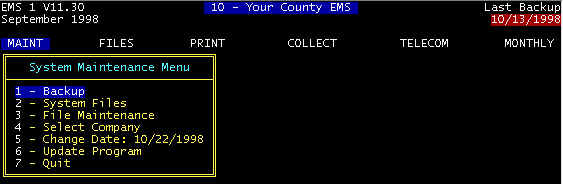 Screen 1--Main Screen 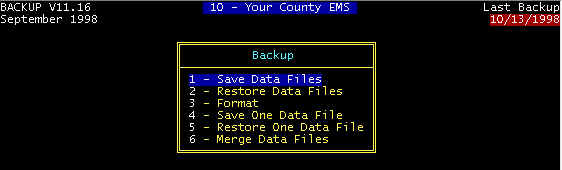 � |
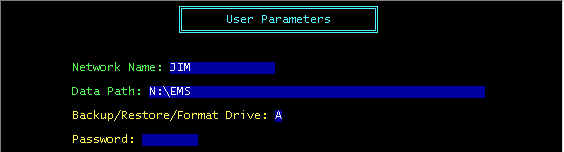
Note that the
designated disk drive for SAVE/RESTORE DATA FILES, and FORMAT is specified
via the following menu path: MAINT/System Files/User, as shown in the next image
The Way BACKUP
and RESTORE Work
You can select one of 32 companies, each having a completely separate and
independent set of databases (Patient, Diagnosis, etc. files). Some ambulance companies
bill for multiple locations (companies), and some utilize the extra companies for
historical (old) data, for example, Company 10 may be utilized to contain the end of month
backup files for 6 months ago; company 11 for 7 months ago, etc.
At any rate, when you have selected a specific company, then backup and restore only affect that company databases, and no other company. for example, if you have selected company 1, then companies 2-32 are in no way affected by backup and restore.
Additional details follow.
SAVE
Save means to compress and then transfer data files from the hard disk (source) to another
disk (destination), usually a removable media - a floppy diskette. Data on the
source drive is not affected, whereas data on the destination drive is overwritten and
permanently lost. If your data files are large enough to require more than one floppy
diskette, you will be prompted as when to insert diskette number 2, 3, etc.
RESTORE
Restore is the opposite of backup, and in this case, data on the hard disk is replaced by
data from the floppy diskette. Thus, data from the floppy diskette overwrites hard
disk data, and hard disk data is permanently lost.
SAVE/RESTORE ONE
Data File
SAVE and RESTORE above saves/restores ALL data files; this option saves a single data
file--see selection screen below.
.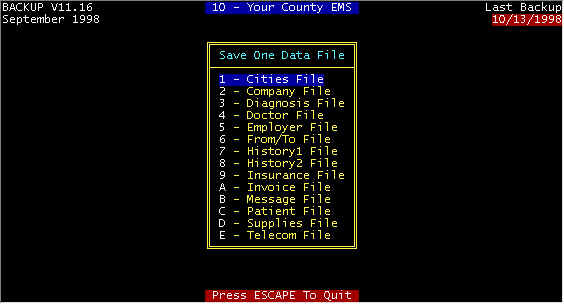
Save/Restore ONE Data File
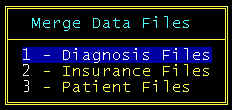
| MERGE Merge will not affect existing data on the hard disk, but will append data from the floppy diskette that is not identical to existing data on the hard disk. If you run two (or more) active EMS companies, then the two EMS companies could have different Insurance files, e.g. You can SAVE ONE DATA FILE from company 1, and MERGE DATA FILES to company 2, such that the EXISTING insurance file (insurance companies) in company 2 are not affected, but ONLY different insurance companies from company 1 are added to company 2. Similarly, diagnosis files (and others) can be merged. See selection screen for files that can be merged. |
|
FORMAT
Some diskettes come un-formatted, meaning that track and sectors are not pre-written.
For mat does this. In addition, disks and diskettes may develop bad places
over time. Format also flags the bad areas and when writing and reading, these
flagged areas are not used.
Good Backup Procedure
Data files should be backed up for each company, both daily
and just before closing each period. A good procedure is to have seven diskettes
(Monday, Tuesday, etc.) plus one diskettes for each end-of-month period. On Monday, use
the Monday diskette, etc. Severe problems can possibly occur by using too few a number of
backup diskettes. For example, assume that two floppy diskettes are used alternately as
backup diskettes. It is not unreasonable to go more than two days before discovering that
all data files, including backup diskettes, are faulty. Recovery from data . You should
watch the screen during backup, in case errors occur; error messages are not held on the
screen. You should notice any irregularities on the screen during backup.
Multi-user
Systems
For multi-user systems, all work stations except the one doing
the backup must either be at the MAIN MENU or turned off when using any of the
Backup functions.
Problems
with Backup/Restore are:
Unformatted diskettes cannot be used
there is only a momentary error message that data was unable to be properly written to the diskette when trying to save the data on floppy diskettes. Unless you are constantly looking at the screen, you will miss the error message and think that you have properly saved your data., at which time a read error is displayed on the screen. The best way to ensure a proper save is to restore the data in a dummy company--this is a good idea for end of month backups where, if lost this data cannot be recovered.
Žif a low capacity diskette is used on a high capacity diskette drive, this diskette cannot be read back (restored); this is a common problem that results in support phone calls. Always use high capacity diskettes -- see section 1.2 for a distinction between high and low capacity diskettes.
not enough diskettes are used for backups. For example, if only one diskette is used, there is a fair chance that at some time both the hard disk files can be corrupted, and the backup files will also be corrupted, and this can continue for more that a single day. Use five diskettes for backup -- label them Monday, Tuesday, Wednesday, etc., and thus you can go back far enough to find a good copy.
Content adapted from the CES EMS Fast Cash Billing Manual on ces-web.com. For support call (706) 882-4704 or email mail@ces-web.com.