Add a new invoice
Most invoice data entry fields are the same from state to state except special fields for Medicare and Medicaid. In addition to the information on these pages, refer to the Medicare and Medicaid specifics for your state.
Special invoices for Contracts (HMO, Nursing Home, Hospice, etc.)
Special codes/fields that vary from state to state
QUICK REFERENCE TO DATA ENTRY FIELDS FOR NEW INVOICES
| Service Date | Due Date | Bal(ance Due) | Patient Code | Name (Patient) |
| Doctor Code | Name (Doctor) | Stat(us) | Code | Ordered |
| Related To Emp(loyment) | Service Type | Accident | Service Level | Round Trip |
| Transported From | Transported to | Signed | Medicare Base Rate Modifier | Medicare Information Code (State dependent-secondary modifier) |
| ICD Code | Pri(mary) Diag(nosis) | Sec(ondary Diag(nosis) | Pri(mary) Pay Code | Sec(ondary) Pay Code |
Screen 1 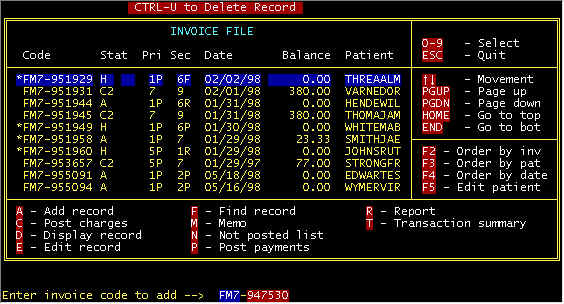 Screen 2 - Main Invoice Screen Letter A key was pressed (A-Add record), and at the bottom, a prompt line is displayed with a blank invoice number for key entry -- for the example above, FM7 and 947530 were entered into the two fields. Then a (mostly) blank detail invoice screen is displayed with the invoice number that was entered and the service date defaulted to yesterday's date. Either press the <ENTER> key to accept the service date or type over the default date. The computer will calculate a due date which will be the first of a subsequent month, and you can either accept or type over -- NOTE -- payment status, etc. plus this due date will affect the severity of statement messages, as described in the section POST PAYMENTS. Bal(ance Due) will show total balance for all invoices this patient, once the patient code is entered. Next, make up a patient code from the patient's name, for example BLACKJIM for Jim Blackstone -- 5 characters of the last name plus 3 characters of the first name. This is not etched in stone, but we have found that this scheme results in insignificant duplication for different people with similar names.Once the patient has been either entered or retrieved (already on file), the patient name is retrieved from the patient data base.� 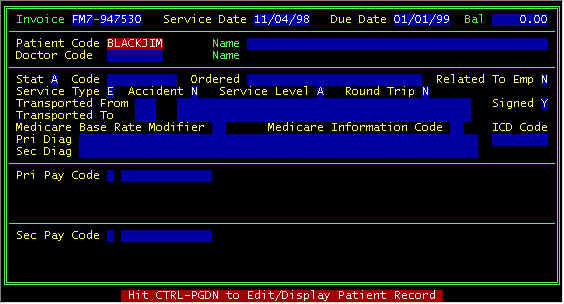 Screen 3 - Detail Invoice Screen fter entering a patient code, one of 2 things will happen:
After a patient has been selected/new one entered, the top part of your
screen will look like this Screen 4 - Detail Invoice Screen After patient selection Doctor Code--(See the DOCTOR Database). The next field to enter is either the attending physician of the referring physician. Once the doctor has either been entered, the doctor name is retrieved and displayed. Often times, an ambulance service transporting a patient to a hospital and/or some facility does not know the physician, and thus, often we will use something like ER Doctor-County Hospital, and more of your screen is filled in as follows:� 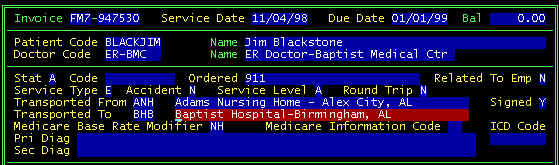 Screen 5 - Detail Invoice Screen Data Entry Continuing the data entry -- On a new invoice, the default Stat(us) is A-Active, but
later may change. When your cursor is at this field, a prompt line will be displayed
at the bottom of your screen as follows: Screen 6 - Detail Invoice Screen Prompt Line-Invoice Status The Code
field is free form, and on a new invoice is usually left blank -- this field is discussed
more in the field descriptions section of the INVOICE
screen in another section. Service Type--screen
below is displayed on your prompt line when the cursor is at this field Screen 7 - Detail Invoice Screen Prompt Line-Service Type E-Emergency--This is the only selection that is classified as an emergency transport; all others are non-emergence. Thus, not select T-Transfer for hospital to hospital transports, when the patient is in a health threatening situation (EKG, IV, etc. enroute)--use Emergency for these type transports. O-Outpatient--These are for local trips (nursing home to Physician Office-Clinic, and to hospital) where the patient is not discharged first facility, admitted second facility. T-Transfer--this is non-emergency facility to facility transport, discharged first facility, admitted second facility. Accident
-- Two types (Auto) and (2) non-auto your prompt line is shown below Screen 8 - Detail Invoice Screen Prompt Line-Accident (enter Y, N, or A)
Primary
and Secondary Diagnoses Primary
and Secondary Pay Codes
Click on one of the categories above for a detailed description There is a priority chain of payers. Payment filing and responsibilities trickle down from the Primary payer, once the primary payment has resolved. Private Pay is the last (and defaulted) when there is some type Medicare. Insurance, etc. coverage. Payment from secondaries are not considered due until the primary payers have either paid or rejected. Three examples of Medicare patients follow:
|





INVOICES FOR
CONTRACTS
(Hospices, Nursing Homes, Hospitals, etc.)
Click here for a sample contract for SNFs under
PPS/Consolidated Billing Part A Stay
If a Patient record is on file with status T
(Contract) for a Nursing Home, e.g. then when an invoice is entered for this contract
patient (Nursing Home), the contract invoice data entry screen will be displayed as shown
below.
�
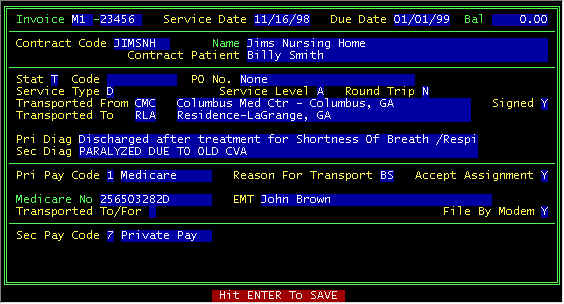
Screen 10 - CONTRACT Invoice
Invoice data entry for a contract patient generally does not have to go through the rigors of medical necessity justification, and hence requires less data entry. Most likely, the contractor (Jims Nursing Home) called the ambulance.