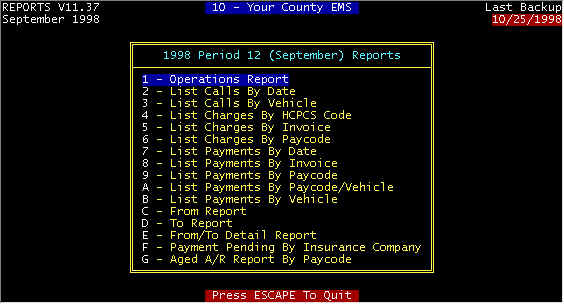
| CHARGES Charges By HCPCS Code
One Page -- Number of charges, total amount, percent this month and YEAR TO DATE.
Charges By Invoice
For the current month, you can select a single date, a range, or all days, and
whether to only print a summary (total charges). The report is one line per posted
charge with column headings Payor, Date, Qty, Price, Total, and at the bottom of the
report is a total of all charges.
Charges By Paycode
Charges posted to Medicare, Medicaid, Auto insurance, etc. are listed with percent
and total for this month and YEAR TO DATE as well as the same numbers for last year. |
PAYMENTS
&
PENDINGPayments
By Date
For the current month to date, payments and writeoffs that have been posted--
Column headings -- >Payment Date >Service Date >Invoice
>Paycode >Amount. At the bottom is listed the total payments that have
been posted
Payments By Invoice
You can select the beginning and ending date, and whether or not to print only the
summary. Assume you are printing everything, then the column headings are:
>Invoice >Date >Paycode >Type >Amount, where
Paycode is payor type (Medicare, Insurance, etc.), Type is the writeoff category.
The summary report is simply payment total amount by payor type. This report is
useful in balancing posted payments with bank deposits, as described in more in the
detailed section for this report.
Payments By Paycode
One page report listing payments by payor type >This Month >Percent >Year
to Date >Percent. Totals, writeoffs, and income from accounts on
collections also.
Payments By
Vehicle
Same as Payments By Date (above), but you can select payments by vehicle
Payments By
Paycode/Vehicle
Almost the same as the previous report, but you can select the report by vehicle.
Payment Pending By
Insurance Company
The report is alphabetized by Insurance company, with each claim listed
plus pertinent information on each claim. This enables you to inquire about all
claims, when making a phone inquiry. Another report Invoice Payment Pending is a similar report, but
list one line per claim by date of services, and thus is a summary of Insurance pending by
service date, but neither groups claims by insurance company not lists detailed
information. Both reports can be used to follow up on insurance claims. |
TRANSPORTS Calls By Vehicle
Enter Vehicle number and the report is the same as Calls By Date
Calls By Date
one line for each call made this month with charges, payments, balance due, and
summary at bottom of report
From Report
One Line per facility where transports originated (From) with number of transports
and percent this month and Year To date.
To Report
One Line per facility where transports terminated (To) with number of transports
and percent this month and Year To date.
From/To Detail Report
For each transport location (To and From) the charges, payments, and number of
transports are categorized and listed for each payor type, with a summary at the bottom of
the report |