Print Statements
Statements are routinely printed--after Medicare/Insurance payments--every day for
large ambulance services; in the middle of the month--past due; at the end of each
month--monthly statements. You may want to limit statements that are
unnecessarily mailed, such as patients who have both Medicare and a MEDIGAP secondary that
has a history of paying 100% of the claim. This and other reasons for not mailing
statements and invoices can be globally or individually controlled by setting
several flags that prevent them from being printed, such as: (1) in the invoice screen set the statement status to something other
than A(ctive) -- H(old) for example--this can be done individually on each invoice.
(2) In the company screen there are several flags that globally
prevent statement from being printed, e.g. do not print statements for Medicaid
patients, and there are other flags. This will categorically (globally) exclude
Medicaid patients from receiving statements and invoices, whereas setting the status flag
in the invoice screen will only affect one invoice, as previously described.
Figure 1 -- Statement
printout
Print Monthly Statements
Print Statements: Past Due 31-60 Days, Private
Pay Pending
Print Statements: Balance Due After
Insurance/Medicare Payment
Print Statements: Past Due
31-60 Days, Insurance/Medicare Pending
Print Statements: Past Due >60 Days, Private Pay
Pending
Print One Receipt Statement
Menu Path: PRINT/statements
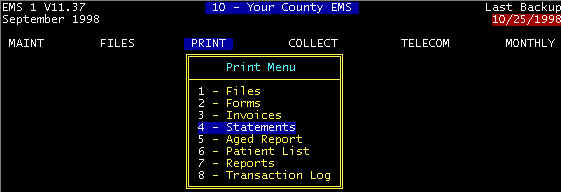
Screen 1 Main Menu-PRINT
�
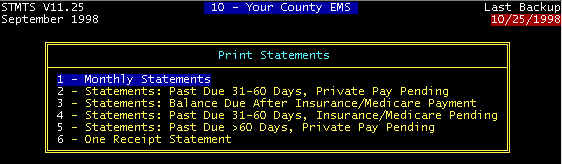
Screen 2 - PRINT/Print statements
�
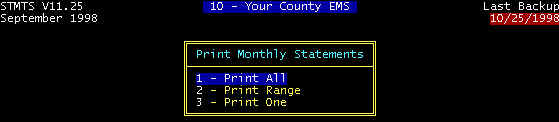
Screen 3 - PRINT/Print statements
�
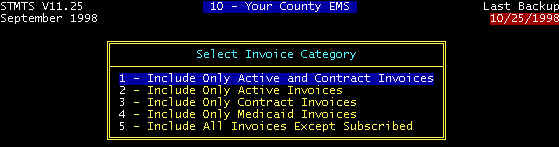
Screen 4 - PRINT/Print statements
Item 1 is usually the choice as shown. Active, Contract, and Subscribed are
status flags in the invoice screen; Medicaid is paycode 2 in the invoice
screen.
�

Screen 5 - PRINT/Print statements
Zip code sorts will allow you to bundle statements by zip
code and thus reduce your postage. However, this is only effective when you have
many statements with the same zip code.
�

Figure 1 - Statement Printout
Usually, the first of the month is set as the statement date,
even though the statement is printed a few days before or a few days after.
Your County EMS
Patient Code: BLACKJIM JIM
BLACKSTONE Please return top portion with payment. Date: 11/25/98 S T A T E M E N T Page 1 Patient: Jim Blackstone Invoice Date
Description Charges
Payments Balance We have not yet RECEIVED YOUR PAYMENT THIS MONTH. All monthly $ 380.00 Currently Due **********************FOR AMBULANCE, DIAL 911************************* |
Several Notes:
- This company is using right-windowed envelopes--note the position of the address. Right, left, both windows is user-defined via the company screen.
- The dotted line is a fold line such that the address will appear in the envelope window. For HCFA forms, you must determine the correct fold for the address to appear in the window. If you use windowed envelopes, you should never have to address invoices, statements, or forms. Right windowed envelopes are recommended since some laser printer HCFA 1500 forms have a bar code in the left window position.
- The dotted line is also a tear line for the patient to mail their payment.
- Payment description -- $100 deductible, $40.79 copay -- This helps the patient understand their payment responsibility, and you have a free-form field in which to enter whatever you choose when posting payments. You may want to include payment descriptions on some -- not all -- invoices, only when clarification is needed.
- Payment description -- Writeoff - Mcare Contractual -- When there is a contractual writeoff, this message is automatically included, unlike the previous payment description that you enter on a claim by claim basis.
- Message -- We have not yet RECEIVED YOUR........... -- This message is automatically retrieved from the message database based on the invoice conditions. This is obviously a monthly payment account.
- Message -- *****For Ambulance......... -- This message at the end of all statements per the message database.
Print Monthly Statements -- Statements should be printed near the first of each month, preferably a few days before.
Print Statements: Past Due 31-60 Days, Private Pay Pending -- Normal due date (see the invoice screen) is at least one month after date of service. Thus, 31-60 days is 2-3 months after date of service, and this invoice is getting old. However, the due date may be unfair to the patient if the primary payor was slow in paying, and now it is private pay. Therefore, print these statements, but review primary payments (if any), and adjust the due date if appropriate and mail only those that need to be mailed.
Print Statements: Balance Due After Insurance/Medicare Payment -- The sooner statements can be printed after posting Medicare / Insurance payments, the better. Thus, this option is listed as a daily billing procedure. However, if there are only a few days before printing monthly statements, you may want to omit exercising this option.
Print Statements: Past Due 31-60 Days, Insurance/Medicare Pending -- Normal due date (see the invoice screen) is at least one month after date of service. Thus, 31-60 days is 2-3 months after date of service, and it is obvious that the Primary payor (Medicare/Insurance) is not paying on time. However, there may be some valid reason for the payment delay, and the due date may be unfair to the patient. Print these statements about the 15th of the month, but review each before mailing.
Print Statements: Past Due >60 Days, Private Pay Pending -- Normal due date (see the invoice screen) is at least one month after date of service. Thus, 31-60 days is 2-3 months after date of service, and it is seems obvious that the patient is is not paying on time. However, there may be some valid reason for the payment delay, and the due date may be unfair to the patient. Print these statements about the 15th of the month, but review each before mailing.
Print One Receipt Statement -- When a patient makes a payment at the billing office, a receipt can be printed at this time.
Content adapted from the CES EMS Fast Cash Billing Manual on ces-web.com. For support call (706) 882-4704 or email mail@ces-web.com.